



Have a Question ?
Ask about our products, services, or latest research. Let's discuss how we can help you solve your problem.
Send Message Box
Send Message Icon
Friday, June 05, 2026
Understand the Role of 4D and 5D BIM in Construction Project Management
By
Shubham Dom
Understand the Role of 4D and 5D BIM in Construction Project Management

Understand the Role of 4D and 5D BIM in Construction Project Management

The construction industry has long operated with fragmented information. The schedules are in spreadsheets, cost data in separate ERP systems, and 3D models sit in isolation on an engineer's workstation. Building Information Modeling (BIM) has been steadily dismantling these silos using 3D. But it is the fourth and fifth dimensions of BIM — time and cost — that deliver the most transformative value to project teams today.
This blog uncovers what 4D and 5D BIM mean in practice, what dashboards and metrics each dimension produces, when to use which, and where the technology is heading.
Rethinking the BIM Dimensions
Most people in construction are aware of 3D BIM. It defines geometry, clash detection, and coordinated models. Adding time creates 4D BIM. Adding costs creates 5D BIM. But the difference between them is not merely an additive.

Time-Linked Modelling

The 3D model is linked to the construction schedule. Every element in the model is attached to a task, giving you a simulation of how the project builds over time — visually and analytically.

Cost-Integrated Modelling

The 3D model (and often the 4D schedule) is linked to cost data. Every asset carries a unit of cost, enabling budget tracking, financial forecasting, and real-time cost-performance analysis.
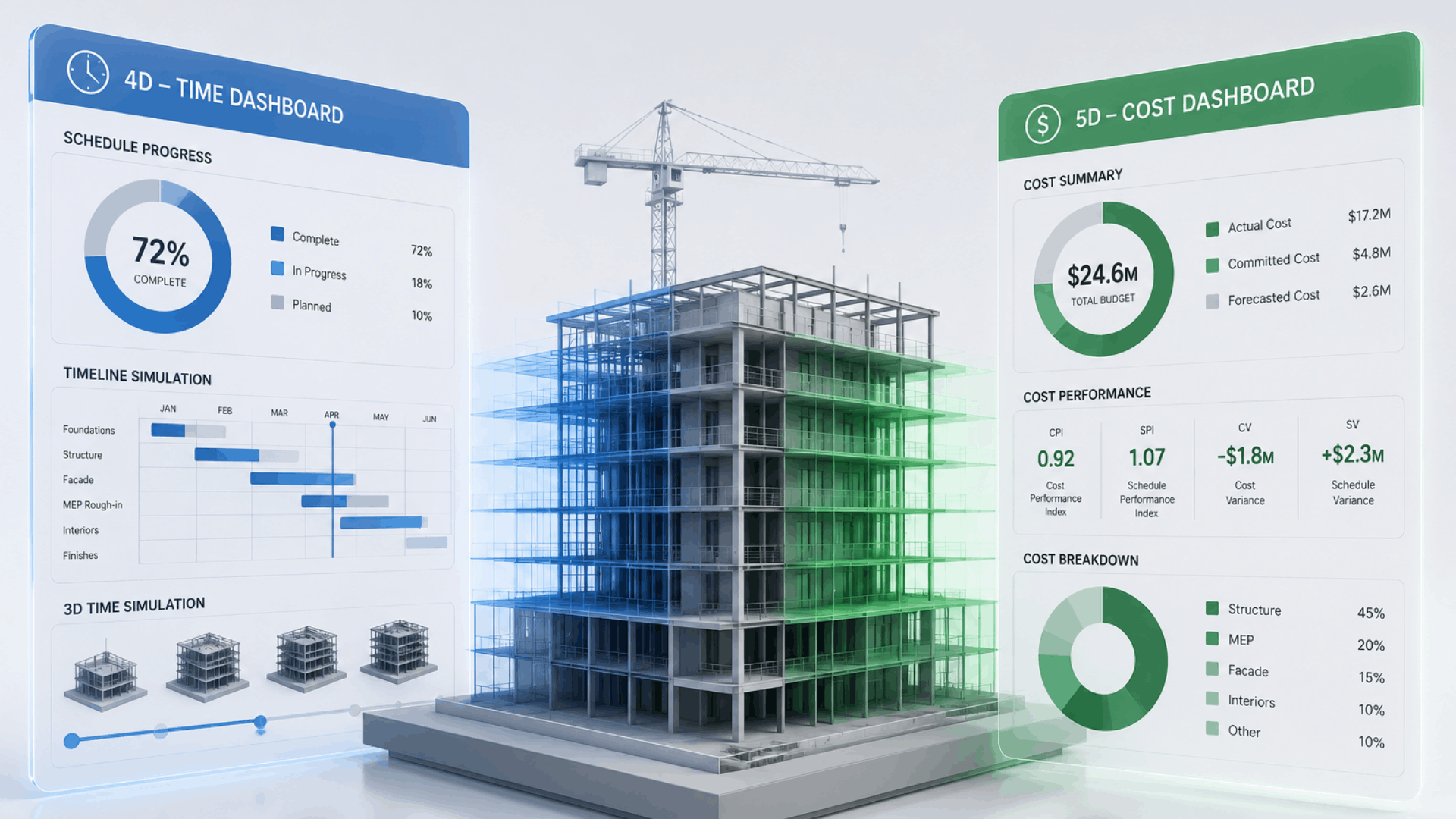
Together, these two dimensions answer the two most critical questions in any project: Are we on time? And are we within budget?
Placeholder Image
4D BIM: What It Measures and Why It Matters
A 4D BIM environment is fundamentally a schedule intelligence layer placed on top of your model. It transforms a static Gantt chart into something far richer — a dynamic simulation where you can see construction progress, predict bottlenecks, and monitor execution against the baseline plan.
Key metrics produced by a 4D BIM dashboard

Total Timeline

Full planned duration from earliest start to latest finish

01

Passed Timeline

Elapsed time relative to simulation or today's date

02

Remaining Duration

Time left against the current approved schedule

03

Execution %

Completed task durations vs planned — the truest progress figure

04
Beyond key metrics, a mature 4D BIM platform provides richer analytical layers that help project leadership make decisions before delays become crises.

Schedule Chart (Gantt)

Time-phased task hierarchy with durations, dependencies, and predecessors.

Critical Path Map

Highlights the exact chain of dependent tasks that control the project’s finish date. Any delay here is a project delay.

Plan vs Actual S-Curve

Plots of cumulative planned progress against actual progress over time. The gap between these two curves indicates schedule health.

Overdue Task Tracker

Lists tasks beyond their planned finish with delay in days, a risk classification (Low / Medium / High), and recommended corrective action.

Asset Summary

Categorized count of all model assets, giving a high-level scope distribution view aligned to the schedule breakdown.

Asset Distribution

Visual representation of how assets are proportionally distributed across categories.

The S-curve divergence indicates the distance between planned and actual progress lines. It is the single most important early-warning signal in a 4D dashboard. A widening gap in 2-3 months rarely corrects itself by month six without direct intervention.
5D BIM: What It Measures and Why It Matters
5D BIM elevates the model into a financial instrument. Where 4D tells you when work happens, 5D tells you what it costs as it happens. It is a live financial performance layer that connects asset data, procurement activity, and cost curves into a single coherent view.
Key metrics produced by a 5D BIM dashboard

Budget

Approved project budget across all assets and activities.

01

Utilized Cost

Actual spend based on assets marked as utilized.

02

Remaining Budget

Available balance after deducting all utilized costs.

03

Cost Overrun

Expenditure beyond approved budget — zero is the goal.

04
The combination of category-level cost tables, burn rate charts, and the S-curve gives project finance teams a multidimensional view of financial health.

Asset Category-wise Cost

Tabular breakdown of asset counts per category and their cumulative cost contribution. It is essential for scope-to-cost alignment.

Cost Distribution (Pie)

A percentage-wise cost share of each asset category in the total project budget. It quickly reveals cost concentration risks.

Monthly Cost Burn Rate

Bar chart of monthly expenditure across the project timeline. Spikes in burn rate often signal procurement or sequencing issues.

5D S-Curve

Time-phased comparison of cumulative actual cost vs planned budget. The financial counterpart to the 4D schedule S-curve.

Last 10 Invoices

Recent vendor transactions including invoice amount, date, and payment status to maintain financial auditability

Overall Financial Visibility

The 5D dashboard links cost data to assets, time, and execution progress to have financial control.

5D S-curve is the financial twin of the 4D schedule S-curve. When actual cost runs below planned cost early in the project, it may indicate slower-than-expected progress. Reading both S-curves together is critical for accurate earned value assessment.


Placeholder Image
Closing Thoughts
4D and 5D BIM are no longer aspirational technologies for large contractors and public clients. They are becoming standard expectations on any project where schedule risk and cost performance are material concerns.

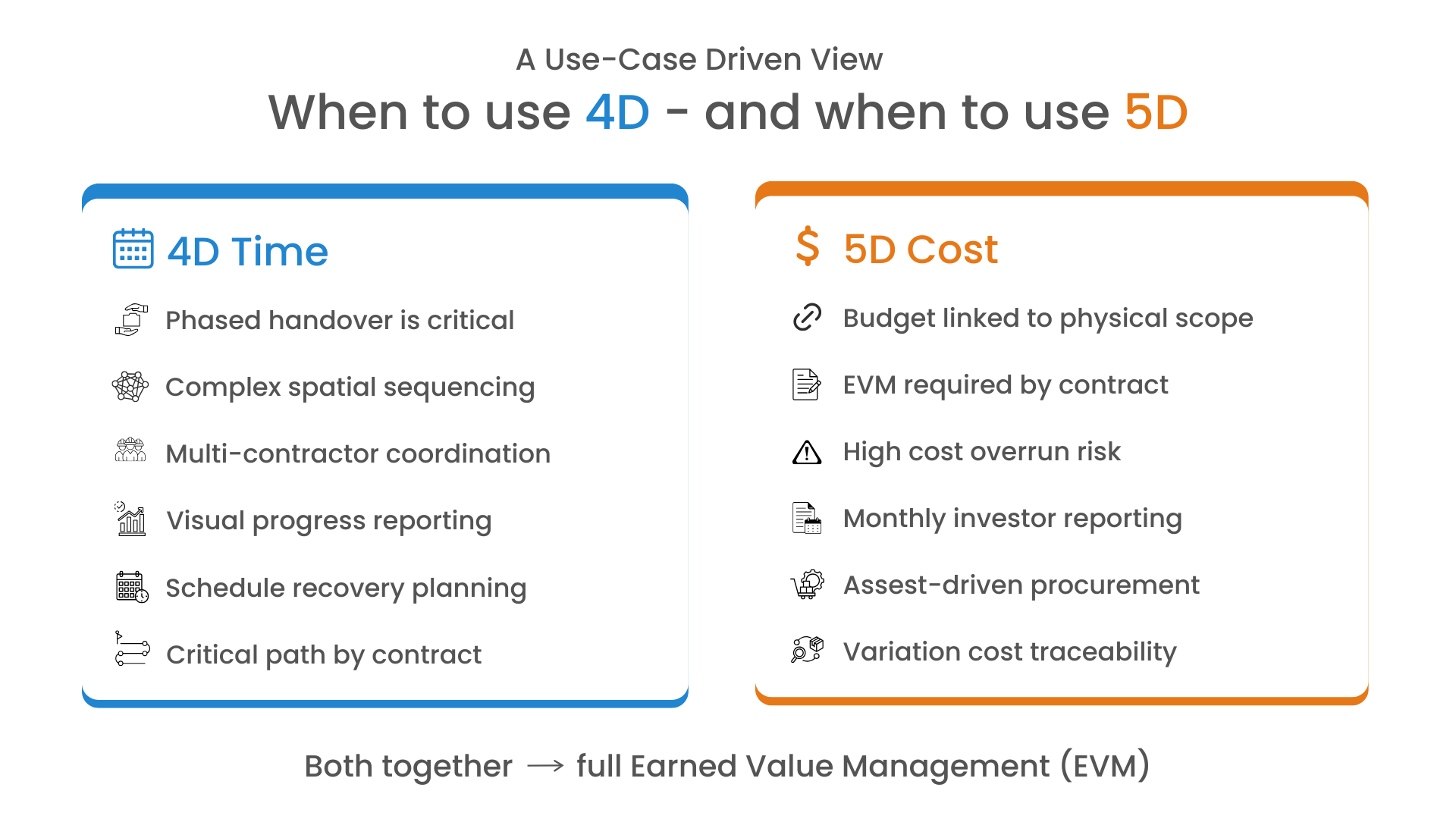
The distinction is worth restating clearly: 4D tells you where you are in time. 5D tells you where you are in money. Used together, they give project leadership the clearest possible picture of whether a project is truly on track or just on paper.
About author
Shubham Dom
Shubham Dom is the Manager of the AECO business, driving Autodesk AECO and Autodesk Construction Cloud (ACC) solutions across India, Asia, and the Middle East. He focuses on building end-to-end digital construction management ecosystems, with ACC as the core platform integrated with custom applications and enterprise systems. He specializes in custom software development, Autodesk customization, and scalable platform design, delivering BIM-led and data-driven solutions.
Comments